

















♫ The sun will come out tomorrow
So you gotta hang on
’til tomorrow, come what may!
Tomorrow, tomorrow, I love ya, tomorrow
You’re always a day away! ♫
Lyrics and music by: Charles Strouse and Martin Charnin, recorded by Anne.

This is the time of the year that I love! The 2016 Predictions – Part I! Our group of thoughtful prognosticators have put their thinking caps on and now we can see what they think lies ahead. In this instalment, we have predictions from:
- Gerry Riskin
- Bill Lipner
- Jordan Furlong
- Terrance Hudson
- Larry Bodine
- Buzz Bruggerman
- Colin Rule
- Ellen Freedman
- Bob Denney
- Sharon Nelson and John Simek
- Joshua Lennon
- Sheila Blackford
- Andre Coetzee
- Ben Stevens
- Brian Mauch
- Nikki Black
- Frank Fowlie
- Russell Alexander
- Michael McCubbin
- Rob Walls
- Rodger Smith
- Kevin O’Keefe
- Yours truly and others…
I hope you have as much fun with these as I do! And you, gentle reader, can send in your predictions for the next instalment!
Gerry Riskin:

In 2016, The legal profession camel will grow a 3rd hump.
Traditional hump number one will be the top firms doing the top work for the top clients. They have their own set of problems but for the most part will survive for at least one more year.
Hump number two will be firms that are sensitive to a major shift in the marketplace and will adapt quickly and imaginatively with sophisticated project management, pricing and labor allocation.
Hump number three are the firms that are holding on to tradition for dear life. One well known hump three firm (that was perceived to be very strong) will surprise the marketplace by disclosing major weakness under their financial hood and rapidly liquidate. This event may be the catalyst that causes other hump three firms to move into hump two with great speed as 2017 approaches.
About Gerry:
“When Gerry speaks, he reaches parts of your mind that have never been used before.”
–Sue Stapely, Solicitor and Media Professional; London, England
Gerry Riskin, B.Com. LLB, P. Admin, is a Canadian lawyer and Business School graduate with a global reputation.Gerry has clients including the most prominent firms in the world. Gerry is also a Visiting Fellow of The College of Law in London and a Visiting Professor to the Gordon Institute of Business Science at the University of Pretoria in South Africa, and a Fellow of the College of Law Practice Management.
Gerald Riskin is a Canadian lawyer and Business School graduate with a global reputation as an author, management consultant and pioneer in the field of professional firm economics and marketing.
After winning two Queen Elizabeth Scholarships, he practiced law from 1973, in 1979 becoming a partner with one hundred-year-old Emery Jamieson and then in 1984 becoming the Managing Partner of Snyder & Company with offices in Canada and Hong Kong. Gerry was consistently a strong rainmaker and quickly began to develop a reputation which led to a demand for his abilities to teach others to attract clients.
In 1983, Gerry co-founded The Edge Group which in January 2001, evolved into Edge International. Edge topped the list in a survey depicting the most popular marketing consultants by major U.S. firms.
Gerry authored ABA best seller The Successful Lawyer available as a book and a CD audio program. Gerry co-authored, at Butterworths’ request, a text on the marketing of legal services called Practice Development: Creating the Marketing Mindset, and, for The Institute for Best Practices, two works for those in firms with management responsibilities: Herding Cats and beyond KNOWING, both of which have become management best-sellers (Herding Cats has remained on the “Canadian Management Bestsellers “list for several years).
A popular facilitator, teacher and retreat speaker, Gerry is a widely recognized expert on managing professional service firms, described by The Financial Post as “Canada’s professional firm management and marketing guru, with a client base stretching from Britain to the United States.” Professional marketing pioneer, Bruce Marcus, said of him in Competing for Clients, “Light years ahead of almost everybody else, his clientele is indeed worldwide.” Recently, the head of a national conference said of Gerry’s session, “As far as I’m concerned, that was the best practice-related seminar I’d ever attended!” His highly interactive approach mixed with energy and humour keeps attendees engaged and eager for more.
Bill Lipner:

I’ll bite (no pun):
- With corporate resources at hand, law departments will deploy technology which (significantly) further reduces the role of outside counsel.
- A key technology in law will be artificial intelligence which will be used to replace human powered work with machine powered work. AI is starting with routine tasks like document review but will be applied to higher level tasks like contract review and facts analysis.
- The “innovative few” law firms will deploy emerging technologies to reinvent their business, making it easier for them to take larger slices of the services pie at the expense of their peer firms.
- Non-lawyer ownership will be permitted in the USA by 2018.
About Bill:
Bill Lipner is a consultant and marketing executive with over 20 years of experience in content management and how unstructured data is created, managed, shared, and leveraged for bottom line benefits. Bill’s experience includes work with document management systems in document-intensive organizations, collaboration solutions, and how to move organizations to the paperless office.
Special focus on legal practice and special interest in teaching information consumers in any organization how to best leverage the technology they are using to manage and predict risk, meet compliance obligations, and drive operational efficiency and effectiveness.
Bill holds an MBA from Florida State University,is a Certified Document Imaging Architect (CDIA), and an Adobe ACE (Acrobat 10.1).
EMAIL Bill at bill.lipner@discoverypartners.us
LinkedIn http://www.linkedin.com/in/lipner
Jordan Furlong

Thanks very much for the invitation, Dave! Here’s my best shot:
We’ll look back at 2016 as a turning point for legal regulation in Canada. “Non-lawyer” ownership of law firms was stymied in 2015, but this year will bring us something profoundly more important: proactive, principle-based, entity regulation of legal services. Starting with Nova Scotia and the Prairie provinces, law societies will shift the regulatory focus away from rules of conduct and lawyer misbehaviour and towards “ethical infrastructure” and enterprise-level responsibility for maintaining and improving a regulatory culture. This will have an enormous influence on how lawyers practice, how law firms manage, how law schools teach and how law societies regulate. ABS would have affected maybe 1 lawyer in 100; entity-based regulation will affect every single lawyer in private practice.
About Jordan:
Jordan Furlong is a leading legal industry analyst who forecasts the impact of the changing legal market on lawyers, clients, and legal organizations. Jordan has addressed dozens of law firms, state bars, law societies, bar executives, law schools, and judges throughout the United States and Canada on the evolution of the legal services market.
Terrance Hudson:

My predictions for family law are as follows:
The Courts will continue to be viewed as a resource of last-resort for those experiencing family law issues; and, mediation, arbitration and other forms of dispute resolution will continue to increase in demand by the public as they are far less destructive to the family and are more economical.
While families may break up, the family dynamic must be maintained. The courts are not set up to handle these types of things as they are based on confrontation principles such as the Rule in Brown v. Dunn. The Courts will continue to be overburdened by those that cannot afford private alternative dispute resolution services and by those who do not want to do the work necessary to help people work out solutions.
In my view, the Legal Services Society should expand its funding of alternative dispute resolution services by increasing funding to mediation, and adding arbitration and parenting coordination services. This would expand the access to these services that are desperately need to reduce the burden on the Courts, to expand access to justice, and provide a more wholistic process for the resolution of disputes. Training needs to continue to be at the high end for those wishing to practice these areas.
The reality is that families are irreparably harmed by trials. While they are necessary in about 5-10% of cases where there is abuse, in most cases they are not required. Lawyers need to be increasingly creative, use alternative dispute resolution methods and avoid trials that can needlessly destroy families.
About Terry:
My interest in family law includes representing clients in the provincial and supreme Court, acting as a mediator and arbitrator, writing articles and doing my best to provide information to the public that is of general interest in a manner that is readily accessible.
The Courts processes are often difficult to understand and navigate and thus, I do my best to provide information to assist those who are unrepresented to seek Justice for themselves. www.hudsonlawyers.ca
Larry Bodine:

Here are my marketing predictions for 2016.
- SEO officially becomes obsolete in 2016, killed off by repeated Google artificial intelligence and algorithm updates.
More blogs = more business. Law firms that don’t adopt content marketing with a frequently-updated blog will gradually fade away, as other web-savvy law firms nip away 2-3 good files per month — like being nibbled to death by ducks. Smart law firms already know that more frequent blogging equals more leads and clients, according to Hubspot. - Social media goes legal. Troglodyte law firms will start to get active in social media, because the more engagement their posts get, particularly on Facebook and Google+, the higher the authority that Google will assign to the website.
- Law firms will start to create non-promotional, single-topic informational sites — like Drugwatch.com (sponsored by the Peterson Firm) or BrainandSpinalCord.org (sponsored by Newsome Melton) — to capture clients early in the decision-making process when they are researching their injury.
- Law firm marketing will be shaped by the way consumers search for an attorney. For example, the top directories for personal injury attorneys are:
- FindLaw.com
- Avvo.com
- Yelp.com – surprise!
- Lawyers.com
- Thumbtack.com – surprise!
- Review sites. Law firms will assign staff and develop systems to methodically get good reviews on imporant sites like Google, Yelp and Lawyers.com. Approximately 83 percent of people check lawyer reviews as the first step to finding an attorney.
About Larry:
Larry Bodine is a marketer, journalist and attorney who knows how to turn website visitors into clients for trial law firms. His team has drafted law firm blog posts for many websites including The National Trial Lawyers, PersonalInjury.com, Martindale-Hubbell, Lawyers.com and LexisNexis. Results include:
He was inducted into the PILMMA Hall of Fame in July 2015.
4 Million consumers read the latest legal news on Lawyers.com over a 12-month period, producing more than 7 Million page views.
The LawMarketing Blog gets 400 visits per day — more than 1 million visits over the last 10 years.
Larry is followed by 23,000 people on Twitter followers, he is in 2,000 Google+ circles, and participates in dozens of LinkedIn groups.
He writes for websites like the Huffington Post, the LexisNexis Business of Law Blog, state bar association websites, LawFuel, and trial law firms.
He is the Editor in Chief of PersonalInjury.com, the leading news site about verdicts and settlements.
Larry updates The National Trial Lawyers website every day with legal news for lawyers.
To get a content review of your website, call Larry today at 520.577.9759.
For Business Development Training for Your Firm, visit bit.ly/BodineTraining.
Buzz Bruggerman:

Given the anti-immigrant hysteria here in parts of America, coupled with the madness around gun control, here’s my prediction vis a vis American politics…
I fully expect Hilary Clinton to get the Dem. Nomination, and at the end of the day I expect the Reps to rally around someone like John Kasich. In November 2016, I expect the R’s to win by a hair, and for our country to be plunged into 4 or more years of darkness.
Very depressing prospects, but America is becoming very polarized, and I see nothing that is going to reverse that process in the near term.
About Buzz:
Trying to change the world, and helping to connect great people.
ActiveWords Co-Founder, Tech Evangelist, connector, small town Minnesota boy, Duke grad, and serious Duke basketball fan.
Colin Rule:
![crule at cpr[1]](http://thoughtfullaw.com/wp-content/uploads/2015/12/crule-at-cpr1.jpg)
2016 will be the year of ODR and Consumer Protection. Some folks might remember the conference held in Vancouver in 2010 focused on ODR and Consumers. 2016 will be the year many of the ideas hatched there finally come to fruition. The EU ODR regulation will come live early in the year. The UNCITRAL ODR Working Group will wrap up over the Summer, issuing a position paper from all the delegates calling for high quality cross-border consumer ODR. The OECD Council on Consumer Protection in eCommerce will finalize recommendations calling for quality ODR. Amy Schmitz and I will also publish our book on ODR and Consumer Protection through the American Bar Association. The need for fast and fair redress for consumers is finally coming a head, and the consensus is that ODR is the only path forward. 2016 will be the breakthrough year.
About Colin:
Colin Rule is Co-Founder and COO of Modria.com, an ODR provider based in Silicon Valley. From 2003 to 2011 he was Director of Online Dispute Resolution for eBay and PayPal. He has worked in the dispute resolution field for more than a decade as a mediator, trainer, and consultant. He is currently Co-Chair of the Advisory Board of the National Center for Technology and Dispute Resolution at UMass-Amherst and a Non-Resident Fellow at the Gould Center for Conflict Resolution at Stanford Law School.
Colin co-founded Online Resolution, one of the first online dispute resolution (ODR) providers, in 1999 and served as its CEO (2000) and President. In 2002 Colin co-founded the Online Public Disputes Project (now eDeliberation.com) which applies ODR to multiparty, public disputes. Previously, Colin was General Manager of Mediate.com, the largest online resource for the dispute resolution field. Colin also worked for several years with the National Institute for Dispute Resolution (now ACR) in Washington, D.C. and the Consensus Building Institute in Cambridge, MA.
Colin has presented and trained throughout Europe and North America for organizations including the Federal Mediation and Conciliation Service, the Department of State, the International Chamber of Commerce, and the CPR Institute for Dispute Resolution. He has also lectured and taught at UMass-Amherst, Stanford, MIT, Pepperdine University, Creighton University, Southern Methodist University, the University of Ottawa, and Brandeis University.
Colin is the author of Online Dispute Resolution for Business, published by Jossey-Bass in September 2002. He has contributed more than 50 articles to prestigious ADR publications such as Consensus, The Fourth R, ACResolution Magazine, and Peace Review. He serves on the boards of the Consensus Building Institute and the PeaceTech Lab at the United States Institute of Peace. He holds a Master’s degree from Harvard University’s Kennedy School of Government in conflict resolution and technology, a graduate certificate in dispute resolution from UMass-Boston, a B.A. from Haverford College, and he served as a Peace Corps volunteer in Eritrea from 1995-1997.
Ellen Freedman:

The perfect storm has arrived. I (and other PMAs – Practice Management Advisors) predicated it’s arrival long before the recession hit. Thanks to the layoffs and freezes on hiring during the recession, the storm was temporarily delayed in arriving. Now that the legal industry sluggishly pulls out of the pit many firms fell into, the storm effects are clearly being felt.
The perfect storm I am referring to is the shortage of available law firm personnel suited to the positions open. Primarily we are hearing the first desperate pleas for help from firms located in rural and suburban areas. Whether the opening involves a legal assistant, legal secretary, bookkeeper, paralegal or courthouse runner, or any other administrative position, firms are struggling harder than ever to find suitable candidates.
The perfect storm has been created by a convergence of many factors:
- Accelerating rate of retirement of the “old guard” of experienced legal secretaries, estate administrators, and so forth.
- Lowered quality of available entry level candidates – many of whom lack the most basic skills in reading, writing, spelling, grammar and proofreading.
- Law firm’s inability and unwillingness to train, accompanied by increasing complexity of even the simplest positions.
- Increasing move of candidates entering the workforce toward higher positions than before, which in turn tends to increase demand for administrative support even further.
- Diminished regard for administrative positions by potential employment candidates.
- Increased competition with other industries which provide advancement opportunities not available in the legal industry
- A smaller workforce demographically, despite dual-career households as the new normal.
Professionals are included. As firms seek to start regrowing their firm’s associate ranks from the bottom, the average law firm struggles to find the combination of work ethic and abilities necessary to join what is essentially still a mostly sink-or-swim environment. Firms with brand names or profitable boutique practices continue to entice the best and brightest candidates. The rest of the firms scramble over the remaining candidates. General practices in rural areas risk dying due to lack of talent for succession purposes, rather than lack of demand for services.
About Ellen:
Ellen serves as the Law Practice Management Coordinator for the Pennsylvania Bar Association. In that capacity she assists PBA’s members with management issues and decisions on the business side of their practice, including areas like technology, financial management and profitability, human resources, marketing, risk management, setting up a practice and so forth. PBA members are encouraged to contact Ellen through the 800 “Hot Line” at PBA headquarters, (800-932-0311 x2228) or through email (lawpractice@pabar.org).
Ellen is founder and President of Freedman Consulting, which assists PA law firms with a full range of issues and projects on the business side of the practice. More information about Ellen and her law practice management services may be obtained at http:www.FreedmanLPM.com. Ellen also publishes the Law Practice Management blog at www.PA-LawPracticeManagement.com.
Ellen holds the designation of Certified Legal Manager through the Association of Legal Administrators (ALA), the credentialing body for the CLM degree. Of the 11,000+ members of the ALA, approximately 260 are certified legal managers. Ellen was one of the first 20 in the nation to have achieved this designation. She holds a Certification in Computer Programming from Maxwell Institute, and a Certification in Web Site Design and a B.A. from Temple University.
Ellen managed inside law firms for twenty years. Most of that time was spent in a mid-size (35+ attorney) firm environment. She launched her consulting practice in 1998, and joined the Pennsylvania Bar Association in 1999.
Ellen is an associate member of the American Bar Association, and its Law Practice Management and General Practice & Small Firm sections. She was a member of the Association of Legal Administrators for over 20 years, and founded the Independence Chapter. She is a frequent author and speaker on law firm management issues on a national level.
That is it for Part I – stay tuned for Parts II and III – So you gotta hang on ’til tomorrow, come what may…!!!
♫ I can see clearly now the rain is gone.
I can see all obstacles in my way.
Gone are the dark clouds that had me blind.
It’s gonna be a bright (bright)
bright (bright) sunshiny day…♫
Lyrics and music by Johnny Nash, recorded by Jimmy Cliff.

This is the time of the year when I call for our gentle readers to submit their ideas for what 2016 will hold for the legal community.
Whether it is a bright future or perhaps a guarded cloudy one, I would love to hear from you. Whether it is on legal software, access to justice, online dispute resolution, alternative business structures, changes in legal regulations, business development, legal marketing change management, firm governance, moving to paperless or moving to Mac (or back to Windows), quality of life, tips and trends …all these topics and more are on the table.
Results will be posted in a series of articles near the end of December.
So put your thinking cap on and let’s see what we can to together to write the future!
♫ Confusion’s all I see
Frustration surrounds me
Solution, bid farewell…♫
Lyrics and music by Deryck Whibley, recorded by Sum 41.

(Image: Creative Commons license, courtesy of Evil Erin)
I had to rent a car today. The reasons are not terribly relevant except to say that I didn’t need any additional stress in my day.
The car that I rented was a 2015 Chrysler 200. Nice car. Peppy, nice bluetooth that connected to my Blackberry without any difficulty and great satellite radio when I was not on the phone. I enjoyed the vehicle.
All that changed when I pulled in to fill the tank before returning it. Now I have been driving for decades and have also rented many rental vehicles. I don’t think much about filling them up with gas. What could be easier, right?
I pulled into the filling station and got out only to find that the gas cap had a door over it that didn’t have a finger dent that allowed you to open it from the outside. OK no worries. Went back into the car and started looking for the release button or lever…and looked and looked…everywhere. All the other cars around me were filling up and driving away while I sat there and went thru the car with a fine-toothed comb. Not on the dash. Not in the glove box. Not on the door. Nothing. Nada. Complete blank. OK then …next step: take out the owners manual. Give it a quick scan..nothing in the Table of Contents. Check the Index…both silent on how to open the gas cap door.
Got out and looked at the door again. Pushed and prodded, tried to pry it open…I even said “Open Sesame.” Nada.
Getting back into the car, I started going thru the owners manual carefully. Being a lawyer I am accustomed to looking closely and trying to find something in a long document. Believe me I covered every page. There was a complete absence of any mention of the fundamental task of how to open the gas cap door.
Third step: grab my Blackberry and start searching. Turns out I am not the only person who has had difficulties in trying to figure out how to open the gas cap door on various Chrysler vehicles. Problem is all their proposed solutions didn’t work. And there were a lot of them. Nice car but in this instance, bad design combined with no explanation.
I finally head home, sans any gas and change into more comfortable clothes only to start searching on the Internet with a bigger screen and a proper keyboard. Finally find a site that says that the gas cap is pressure sensitive and you have to press in just the right area to cause it to pop open.
From that point onwards, driving to a filling station, popping the cap and filling the car and returning it was all straightforward except for all the unnecessary frustration caused by the whole experience. Since this is obviously a vehicle used by many car rental companies, there must be many, many others out there who have or will shortly go thru the same needless experience.
Trying to make lemonade from these lemons, I turned to my usual technique which is to try to learn from the experience and place it in a wider context by writing about it.
Why didn’t Chrysler think to put something in the owners manual to tell people who are unfamiliar with the car how to do a task as simple as fill it with gas? Beats me but it must have been an oversight by someone. You can have the greatest product imaginable but if people can’t figure out how to use it, it is really an expensive paperweight or worse.
As lawyers we can deliver a fabulous service for clients but if they don’t understand what is happening or what is expected, they could experience a great deal of frustration with the process. I once talked to a lawyer who drew a process map (or as I used to call them a flow chart…thank you Darin Thompson for pointing out that this was the term used in the Dark Ages) for his clients. This process map showed graphically what would be happening in his client’s case, what to expect when and in what order.
I thought it was a great idea at the time. I think it is an even better idea today after my experience.
Our services may be well understood by us but for someone not familiar with the legal system, they could find the experience to be baffling, confusing and frustrating. We can help them a lot by outlining graphical ways that explain whatever it is that will be happening to them. We can also streamline the justice system to make it more straightforward from a design perspective to simplify the process.
What we don’t want is these people claiming that the entire legal system is failing them and that the solution is to bid farewell with lawyers and their present way of doing things.
♫ I need to hear from You
Before this night is through
I need to hear from You
So I’m waiting, waiting just to hear from you…♫
Lyrics and music by: Robert Hartman, recorded by Petra.

This week, Garry Wise and I chatted about the possible topics that we could cover in this column (posted at slawtips.ca and on this site) over the next while. Without being exhaustive, I pulled together the following list from our discussions. Now it is up to you. In the comments section, please indicate which topic(s) are of greatest interest to you! We really want to hear from you and to write on the topics that you most wish to hear about.
Here is the (incomplete) list of possible topics:
New ways of working:
- Virtual office examples
- Virtual assistants
- Virtual contract lawyers
- Using Skype and other communication methods to reach out
- Portals
- Collaboration tools/applications/websites
- Dragon Dictate and VR on the Mac
- IBM’s Watson and AI: What are the implications?
New Software/web tools:
- Emerging Canadian software
- Apps, Apps Apps!
- Websites: Are they relevant anymore?
- Blogs: Are they relevant anymore?
- Vlogs: Are they the way to go?
- Smartphones
- Tablets
- Sony paper
- Microsoft’s Matter Center
- Why use Twitter? Facebook? LinkedIn? Other SM ?
- Windows 10
- OS X El Capitan
- Do Process Software
Capturing, Organizing and Using Information
- Evernote and OneNote
- Don’t Forget the Milk
- Wunderlist
- IFTTT recipes
- Wikis and law firms
- CanLII Connect
- SurveyMonkey and lawyers/law firms
- MindMapping: The New Way of Legal Thinking?
Security and Privacy
- Portals
- Encryption
- Cryptolocker and other ransomware
- Ethical Hacking?
- How do you handle a security breach?
- Canadian Backup and Storage Services
- Canadian Hosted and Managed Services
Practice Management Software Reviews
- CLIO
- Amicus Attorney
- MyCase
- RocketMatter
- PracticePanther
- HoudiniESQ
- LegalFiles
- PCLaw
- ProLaw
- TimeSolv Legal
- Synergy Legal Suite
Legal Accounting Software and lawyers
- PCLaw
- ESILAW
- Brief Legal Software
- Quickbooks
- Sage50
- XERO
- BillQuick
- CosmoLex
Stages in a Lawyer’s Life
- Entering law school
- Finding Articles
- Life as an Associate
- Life as a junior partner
- Life as a senior partner
- Life as a managing partner
- Life as ‘of counsel’
- Going out on Your own
- Moving Firms
- Finding an Associate
- Office Sharing
- Easing into Retirement
- Moving an Office
- Closing an Office
Using Consultants and Service Providers
- Bookkeepers
- IT providers
- In house IT
- Managed IT services
- Hosted services
- Working with Security professionals
- How to use IT Consultants to Max Advantage
- Apple vs Mac vs Does it Matter Anymore?
- Finding and working with an Office Administrator
Setting up in Practice
- Finding the right location
- Finding the right staff
- Working with staff
- Balancing life and work
- Hiring, firing and managing staff
New Ways of Handling Legal Matters
- ADR
- ODR
- Virtual courts and trials
- Setting up a virtual practice/services
- Taking Technology to Court/Mediations/Arbitrations
- Taking Technology to clients
Other Legal Software
- Optinet Systems
- Emergent Solutions
- Tracument
- Triage Data Solutions
- Dye & Durham
- Thomson Reuters
- Lexis Nexis
- Econveyance
- Esentire
- Worldox
- Primafact
- SAI Systems Auditing
- LexBox
- WordRake
- SimplyFile
Innovative ways of Practising:
- Cognition LLP
- Axess Law
- ABS across the world
New Ways of Thinking about Legal Practice
Whatever we have missed.
Please indicate in the Comments (below) the topic(s) that are most important. Or drop me a line at slawtips1@gmail.com. We hope to hear from you!
♫ Cell phone’s dead
Lost in the desert
One by one…♫
Lyrics and music by Beck Hensen.

[Image courtesy of holohololand at FreeDigitalPhotos.net]
Having just returned from a long tenting camping vacation where my Blackberry was dead for most of the trip, I thought I would pass along some tips on how to avoid the kind of experience that I just went through.
Notwithstanding that we were travelling with both an iPhone and a Blackberry and charging them equally in the vehicle when on the road (courtesy of having USB connectors that allowed us to use the 12 volt ports and plug in the phones to charge while the vehicle was running), the iPhone would have a charge of about 90-95% the next day and the Blackberry would be dead.
Furthermore, the Blackberry kept on stating that it has exceeded its data limit plan (we were in the States for the most part and had data plans that had to be continually renewed) even when it was only ‘alive’ for 1 out of every 3 days (due to the fact that it would only be charged every 3 days due to our travel/camping schedule).
What I found out on my return was that there was a big software update from Blackberry that it kept on trying to download when on the road. If there was a notification of this, I have to say that I didn’t see it. As a result the attempted download ate up the data limit on the plan and also ate up the battery life as well.
So here is a collection of tips to hopefully avoid some of the problems encountered when travelling with a cell phone:
- Get a data roving plan before you leave. It is much better than getting hit with the pay-as-you-go rate in whatever jurisdiction you find yourself.
- Use WIFI whenever possible and turn off the data on your phone. Starbucks is my best friend on the road. For the price of a coffee you can connect to their Wifi network and check your email messages. If you are lucky you can find a table with a power connection too and top up your battery charge.
- If you can, use an unlocked phone or a small tablet that can accommodate a SIM card and purchase a SIM card in the jurisdiction of travel to cut down on your data costs.
- Consider buying a disposable phone in the jurisdiction where you are going. Often these are much cheaper than a roaming plan using a Canadian phone. Furthermore, Canadian cell phones may not work in other jurisdictions.
- Check to ensure that all software updates are installed BEFORE you leave. Or if you find out there is one released while you are travelling, find a WIFI hotspot and do the update there, if possible.
- Make sure you can charge your device wherever you may be. You may need extra plugs and adapters to accommodate the AC power in foreign jurisdictions. See a travel store before you leave.
- Get the apps, music and entertainment files you need before you leave.
- Take photos of your passport, important documents, serial numbers etc and put them in the cloud where you can get at them in the event your device and such are stolen or lost.
- Set up one HTML based email service with an easy to remember password that you can use in the event of an emergency, such as losing your device.
- GPS applications are wonderful when travelling, but remember that they also eat up data at a horrendous rate (at least in my experience).
I hope this helps ease some of the pain when travelling. You don’t want to end up in the middle of the desert with your cell phone dead!
(cross-posted to tips.slaw.ca)
♫ Snap, what a happy sound
Snap is the happiest sound I’ve found
You may clap, rap, tap, slap but
Snap… makes the world go round…♫
Lyrics and music by Moosebutter.
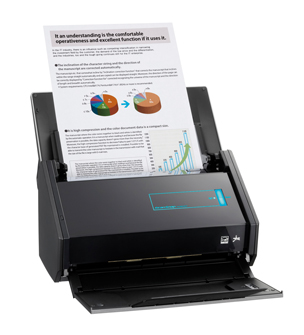
Continuing with the theme of technology that just works, I would be remiss if I didn’t mention the Fujitsu ScanSnap iX500.
This little scanner punches way above its weight. In fact in the years that I have been talking about scanners and going paperless, no one has ever said that they have regretted purchasing one of the ScanSnap line of scanners. They have been a hit with every size firm, with every practice area and every type of lawyer right across North America. Why? They do their job simply, quietly, quickly and very efficiently.
What do they do? Here are the specs:
- 50 page automatic sheet feeder
- full duplex scan
- 25 pages per minute in full colour, faster in B&W
- works with Windows and Mac computers (I use mine with my MacBook Pro)
- works with Android and iOS mobile devices and tablets
- comes bundled with Adobe Acrobat Standard (for Windows PCs only, regrettably for us Mac users) as well as other bundled software
- comes with a ‘carrier sheet’ – a dual layer clear plastic sheet that allows you to scan loose papers and receipts
- can be set to OCR (optical character recognition) files automatically
- detects colour, greyscale and black & white
- you can create a PDF, text-searchable PDF or JPEG file
- using Wi-Fi, you can scan directly to a personal computer, iPhone, iPad or Android device
- if you wish, you can scan directly to your existing Evernote, Dropbox, Google Docs, SugarSync and Salesforce accounts
The ScanSnap iX500 comes with a set of bundled software:
- ScanSnap Manager (Windows and Mac)
- ScanSnap Organizer (Windows)
- ABBYY FineReader for ScanSnap (Windows and Mac)
- Adobe Acrobat X standard (Windows)
- PFU CardMinder (Windows and Mac)
- Rack2-Filer Smart and Magic Desktop (Windows) – Available only with iX500 Deluxe
- ScanSnap Folder (Windows)
- Scan to SharePoint (Windows)
- Scan to Mobile (Windows and Mac)
Full specifications can be found here and system requirements here.
I have a ScanSnap at home and love it. It has allowed me to take my paper files and digitalize them and eliminate the need for paper files. I also upload my documents into Dropbox and this allows me to have a full cloud-copy as well as a local copy of all my documents. Have a hard drive failure? No worries…get a new PC or Windows, link it to your Dropbox account and ZIP…your documents are now dowloaded on your local computer. I know ..I experienced this. Everything in my Dropbox account was quickly and easily recovered notwithstanding the HD crash (unfortunately I found out to my regret that my photos..that I thought were backed up in iCloud ..were not. Now all my photos are backed up in Dropbox). For important documents and folders, I use third party encryption that creates encrypted volumes within Dropbox for security.
In my world, Snap makes the world go round.
(published concurrently on tips.slaw.ca)
♫ He ain’t no drag
He’s got a brand new bag… ♫
Lyrics, music and recorded by: James Brown.

This post continues the ‘no brainer’ posts about technology. This time it is about a bit of technology that most people don’t put much thought into, I suspect, namely their computer laptop bag.
Now some people will say that a bag is a bag is a bag. I am not one of them. In fact I can say that I am quite particular about my bag. I had a nice laptop bag given to me by our local Continuing Legal Education provider for being a volunteer that fit the bill nicely, but when it finally wore out after many years of hard use, I started looking for a replacement.
I first settled on an Eagle Creek bag – the “Strictly Business” carryall. Prior to this purchase I had had a number of bags from Eagle Creek of various sorts and liked them all. However, I discovered that the handles on the Strictly Business were too long…the bag almost dragged on the ground when carried by the handles rather than the shoulder strap- and I am a fellow who is 6’2″ tall.
But when the zipper blew after only 6 months of owning the bag, I went in search of an alternative bag.
What are the features that one looks for in a laptop bag? To me the important features are:
- Size: Look for a nice padded internal compartment for the laptop that is well-padded and once inside, won’t allow the laptop to slide around much. The compartment should be wide enough to take your laptop without a lot of extra room. The standard is to fit a 15″ laptop…if your laptop is bigger or smaller you may want to consider a larger or smaller bag.
- Durable construction. The bag that I received from CLE-BC lasted years of heavy use. That was my measure of durability. Look for good padding, stout seams and good hardware, especially the zippers. If you live in an area of significant rainfall or other harsh weather, ensure that the laptop will stay clean and dry inside. I prefer a soft-sided laptop bag but some may prefer a harder case. Personal preference. Velcro should close easily and be secure. Magnetic fastenings should stay closed. Seams should be well-sewn.
- Style: You are going to be taking this laptop bag to business meetings, on airplanes, checking into hotels and generally having it with you most days. Accordingly the bag should match your style.
- Weight: Leather may be a good choice in terms of durability and style; personally while I like the look and feel of a great leather bag, weight was also a consideration. I carry a great deal of ‘stuff’ and the extra weight of a leather bag was too much for me since I walk to and from the office. Accordingly, a fabric bag that is largely waterproof is high on my list of requirements.
- Size: As I mentioned, I carry a lot of ‘stuff’ from the laptop power cord to various other cords, papers, USB drives, my chequebook etc…so I want a bag that has lots of compartments, pockets, internal zipped pouches etc to organize things such as your cell phone, business cards, pens, a chocolate bar or two, your wallet and passport and even your toothbrush and toothpaste. Ensure that your laptop bag meets the new restricted size limits if you plan to use it on airplanes.
- Color: I am not referring to the color of the outside of the bag…that is a matter of personal preference. But the new bag that I acquired..the Solo Urban 17.3″ Ultracase, while black (with orange trim) on the outside is bright orange on the inside. If you are accustomed to ferreting around trying to find something inside a black bag you will totally appreciate the difference a bright orange lining makes. Finding something is now effortless. Plus the bag is perhaps one of the sharpest I have seen for looks. It it is a joy to carry and easily organizes and stores all my ‘stuff’.
A laptop bag can be one of the most important overlooked items in your business life. When it works well it is practically invisible since it performs its duties effortlessly and in a way that matches your lifestyle. I am quite pleased with my Solo Urban Ultracase…Daddy’s got a brand new bag!!!
(published concurrently on tips.slaw.ca)
♫ I just want the simple things..♫
Lyrics, music and recorded by Miguel.

This post continues the theme of innovative technology for lawyers. John Heckman, a legal technology consultant for whom I have a great deal of respect recently wrote in his blog “Does it Compute” a piece entitled:
Technophobe and Proud Of It — the Consequences. He states that there are “attorneys whose willful refusal to become conversant with their firm’s technology will drag down its productivity and ability to respond to client needs.” John then quotes Sharon Nelson, another good friend and legal technologist who is a co-author of the annual American Bar Association’s Solo and Small Firm Technology Guide (for which the write is a contributing author) put it bluntly: “The raw choice is that lawyers must choose between adaption and extinction.”
Well, fortunately there are technologies that are simple, effective and easy to use even for technophobes. SimplyFile is one of them.
This application which is a toolbar add-on for MS Outlook on the PC (not Mac..sigh!). It does one thing very very well. It is an adaptive program that learns from you where you like to file emails in your Outlook folders.
If you set up your Outlook folders to match your client files, then SimplyFile will help you quickly and easily move both incoming and outgoing emails into their proper file in Outlook. It learns from you and correctly guesses the correct folder 80-90% of the time. Moving the email to the right folder once Simplyfile guesses the folder is just a mouse click.
No longer will you end up with all your outgoing emails in the ‘Sent’ folder in Outlook.
No longer do you ‘drag and drop’ emails to organize them.
I have been using SimplyFile for years now and love it. There are companion applications that speed up other tasks and for those I refer you to Techhit’s web page.
If you use a Document Management System (we use OpenText) Simplyfile helps you move your emails into your profiled folders in Outlook and from there they are indexed into the DMS system. I understand it is equally effective with Worldox and other DMS platforms that work with MS Outlook (but you should check with your DMS provider first).
When it comes to legal technology there is no question that for maximum adoption by lawyers on all points on the legal technology spectrum, the applications should keep it simple.
(cross-posted to tips.slaw.ca)
♫ Good lookin’, so refined
Say wouldn’t you like to know whats going on in my mind?
So let me get right to the point
I don’t pop my cork for every guy I see
Hey Big Spender
Spend, a little time with me…♫
Music and lyrics by: Cy Coleman and Dorothy Fields, from Sweet Charity.

This column starts what I hope will be a series of columns on new and innovative technologies for lawyers.
The kickoff column in this series deals with WordRake.
WordRake is editing software for lawyers.
Most of us have to write for a living. Contracts, pleadings, documents, memorandums – even blog posts – our ideas are as clear as the words, grammar, syntax and tone that we use to communicate our thoughts.
Other than hiring an editor to go over your work, we are pretty much on our own to do our own editing and proofreading.
That is, until WordRake. As Gary Kinder, the developer states, the secret to writing well is rewriting. WordRake will take your writing and suggest edits to remove unnecessary words, improve phrasing, improve your grammar and make dull sentences sparkle.
It allows you to write clearly, be understood and make things happen with your written communications.
If nothing else, you can improve your writing by subscribing to Gary Kinder’s Wednesday Writing Tips.
WordRake works in Windows and with MS Word and Outlook. Alas, it doesn’t work on a Mac or I would be using it to help tighten this column. There is a 7 day free trial at www.wordrake.com. So let me get right to the point, spend a little time with WordRake; it may be the best $199 (Word and Outlook for 1 year) that you spend this year.
(cross-posted to tips.slaw.ca)
♫ Just a short note
You’ll find the key inside…♫
Music, lyrics and recorded by Matt Finish.

Having just returned from ABA TECHSHOW in Chicago my mind is buzzing with everything that I has seen and heard. One of the more interesting sessions was on how to use Evernote (https://evernote.com). Now I have been using Evernote for some time but it seems that you can teach an old dog new tricks.
I became curious about how to use Evernote to not just capture web sites, recipes, legal research and such, but to try to capture the tweets that I was creating while at Techshow.
So with a little research, here is how to craft a note in Evernote that captures all your tweets going forward…without your having to do anything more.
I only wish I knew how to do this *before* Techshow ..that way my Tweets could be a record that I could easily use to write a column…the next step is to figure out how to capture all the tweets that use a certain hashtag like #ABATECHSHOW!
Here is how to create a note to log all your tweets going forward:
1. Go to IFTTT to create an account. IFTTT is a service that allows you to create chains of commands..it stands for IF This Then That.
2. Once your account is created, go to: https://ifttt.com/recipes/114761-twitter-will-automatically-archive-to-evernote and install the ‘recipe’ that will automatically send your tweets to your Evernote account.
Voila! Your tweets will now be logged into Evernote. Just a short note with a key inside!